Short answer: Setting up a Metin2 farmbot with BeaTzVision takes four steps: put the game window into windowed mode at a fixed resolution, assign the window inside the tool, capture target templates, and pick a mode. The process takes about five to ten minutes. The decisive step is template capture. That is where most first-time setups fail.
In this article
Preparation: the game window
A pixel bot works with what it sees. That makes window configuration — not the tool settings — the deciding factor for reliable detection.
- Windowed mode, not fullscreen. In exclusive fullscreen the image cannot be captured reliably on some graphics drivers. Windowed or borderless windowed works.
- Fixed resolution. Pick one resolution and stay with it. Any change invalidates templates you already captured.
- Lock graphics settings. Brightness, gamma and effects influence the colour values in the image. Changing them later shifts the HSV ranges.
- Check display scaling. With Windows display scaling at 125% or 150%, the window can be captured differently than it appears. 100% is the safe setting.
A tip that saves time
Write down your resolution and graphics settings once detection runs cleanly. If months later nothing is detected any more, one of those settings has almost always changed.
Assigning the window in the tool
After starting BeaTzVision you select the game window from the window list. The tool remembers the assignment by window title.
Important for multi-client operation: each instance needs its own assignment. If two windows share an identical title, start them one after another and assign each right after launch. BeaTzVision supports up to two windows simultaneously.
If the game runs with administrator rights, BeaTzVision must be started as administrator too. Otherwise Windows will not permit input simulation into that window. The bot detects everything correctly, but nothing happens.
Capturing templates — the critical step
A template is a small image section the bot locates in the live image. For farming you typically capture the name bar or the marker of your target.
What matters:
- Tight, but not too tight. The section should fully contain the characteristic element and as little background as possible. Too much background means the template only works on that one map.
- Neutral background. Capture the template when there is as little movement behind the target as possible: no water, no effects, no other players.
- Multiple variants. Capture the same target two or three times in different situations. That absorbs variation from lighting or overlay elements.
- Test the threshold, do not guess it. The match score decides when a hit counts. Too high and targets get missed; too low and you get false hits anywhere on screen. Adjust in small steps.
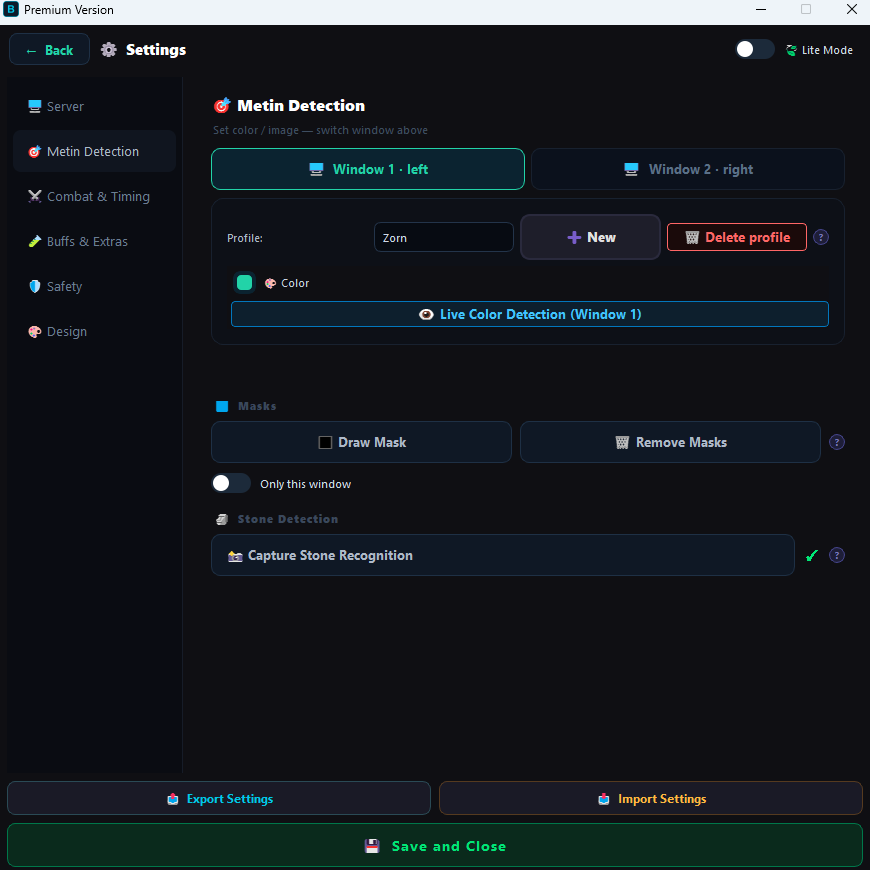
The same principle applies to colour-based detection such as health bars, just in HSV space: keep hue narrow, allow saturation and brightness more room so lighting variation does not immediately cause failure.
Choosing the right mode
| Mode | Purpose | When it fits |
|---|---|---|
| Normal | Fully automatic farming, the bot clicks target after target | Classic AFK farming on a fixed map |
| Macro | You fight, the bot handles looting and pulling | When you play actively and only want the busywork removed |
| Bio | Automatic biologist routine including NPC interaction | For biologist turn-ins, across multiple windows too |
| Queue | Next targets are pre-selected while still fighting | Maximum throughput on densely populated maps |
For a first run, Normal mode on a quiet map is recommended. You immediately see whether detection works without several mechanics interacting at once.
Configuring anti-detection
The anti-detection features are not an accessory. They are the reason sessions stay unremarkable over hours. Three settings matter for a start:
- Enable PM alert. Without it the bot keeps running while someone messages you. That is the most common route to being reported.
- Set realistic breaks. An interval that briefly stops every few minutes looks unnatural. Longer breaks at wider intervals sit closer to real play.
- Use live radar. On busy maps especially, it makes sense for the bot to pause when someone stays nearby.
Why these matter more than the underlying technology is covered in Metin2 Bot Without Ban.
When something does not work
| Symptom | Likely cause |
|---|---|
| Nothing is detected | Resolution or graphics settings changed — re-capture templates |
| Detection works but no clicks | Game runs as administrator, tool does not — start both with the same rights |
| Targets found randomly across the screen | Match threshold too low |
| Targets get missed | Threshold too high or template captured too tightly |
| Detection breaks after a map change | Too much background in the template — capture tighter |
| Black image during capture | Exclusive fullscreen active — switch to windowed mode |
If these steps do not resolve it, Discord support usually helps within minutes — a screenshot of your settings is normally enough.
Frequently asked questions
How long does it take to set up a Metin2 farmbot?
Basic setup takes about five to ten minutes: set windowed mode, capture templates, pick a mode. Most of that time goes into capturing clean target templates.
Why does the bot not detect my targets?
In most cases the templates no longer match the current display. Typical causes are a changed resolution, different graphics settings, active fullscreen mode or an image section captured too tightly.
Can I bot multiple Metin2 windows at once?
BeaTzVision supports multi-client operation with up to two window instances at the same time. Each instance needs its own window assignment; templates can be shared as long as the resolution is identical.
Ready to try it yourself?
Join the BeaTzTools Discord and get access to BeaTzVision and BeaTzSignal, setup guides and support.
Try it free →